How to Get To Forms In HorseTrak
Forms Manual Table Of Contents
Creating or Editing a Form
Selecting Database Data For the Form
Entering Data in the Blanks
Printing the Form
Forms Print Previews
There are two ways to get to the Forms part of the program in the HorseTrak programs. You can either click on the Forms/Contract button:
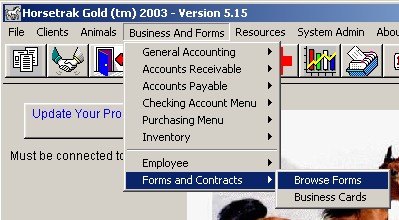
or you can select it from the menu as show (click image to enlarge):
When you make either of these selections, you will be brought to the Forms browse as shown:
Creating or Editing a New Form
|
Site Map
|
Home
|
Download Your Program
|
About Us
|
Contact Us
|
FREE Demos
|
Activation Codes
|
Product License
|
Product Comparison
All Material © 1991-2011 American Riviera Software Corp and HorseTrak Software